


Free WooCommerce extensions and plugins do not require an active subscription to receive updates. This page explains where free subscriptions appear in your dashboard and how to keep them updated.
Free subscriptions in your dashboard
You may see free extensions or plugins listed in your store’s WordPress admin at WooCommerce > Extensions > My subscriptions. Free items can appear alongside paid subscriptions, but they do not require an active paid subscription to receive updates.
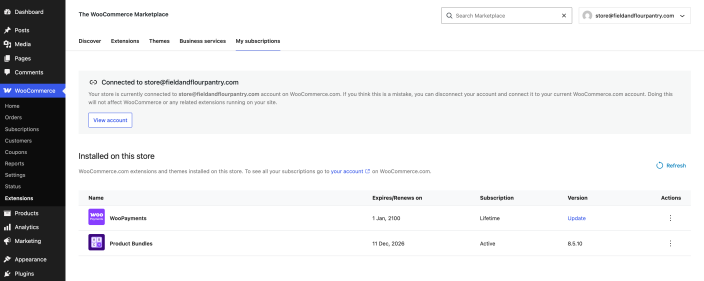 Free extensions can appear alongside paid subscriptions in My subscriptions; free items show a Lifetime subscription state, while paid items can show an Active state.
Update free extensions
Use the Plugins screen in your WordPress admin to check for and apply available updates.
- Go to Plugins > Installed Plugins.
- Find the extension you want to update. If an update is available, WordPress shows an update notice beneath the extension name.
- Click Update now.
- After the update finishes, check the affected store workflow before moving on to the next update.
You can also enable automatic updates for free extensions when your maintenance process allows unattended plugin updates.
Additional resources
For more detail on keeping extensions current, see Updating extensions and payment gateways.
Questions and support
Do you still have questions and need assistance?
This documentation is about the free, core WooCommerce plugin, for which support is provided in our community forums on WordPress.org. By searching this forum, you’ll often find that your question has been asked and answered before.
If you haven’t created a WordPress.org account to use the forums, here’s how.
- If you’re looking to extend the core functionality shown here, we recommend reviewing available extensions in the WooCommerce Marketplace.
- Need ongoing advanced support or a customization built for WooCommerce? Hire a Woo Agency Partner.
- Are you a developer building your own WooCommerce integration or extension? Check our Developer Resources.
If you weren’t able to find the information you need, please use the feedback thumbs below to let us know.